
Google calendar
New google calendar events create items in your Fractal account.
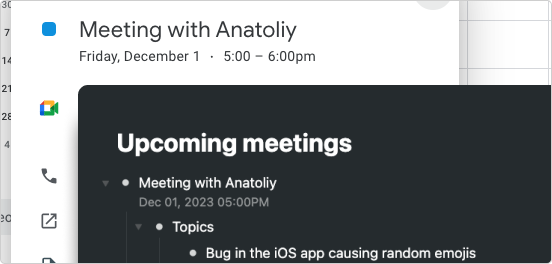
Whenever a new calendar event is created, say by a calendly request or a colleague inviting you to a team meeting - zapier can create a new item in Fractal to hold all your meeting notes and turn important items into to-do's. This is also a great way to quickly see all your upcoming meetings in a single list in Fractal.
How to use
Once you've connected your google calendar with this zap, anytime a new event is added, the details are also added to your Fractal account.
- Click 'Use this zap'
- Connect Google calendar to zapier
- Choose the calendar to monitor
- Test the trigger
- Connect your Fractal account (need your api key?)
- Set 'Description' as the Title and 'Event Begins (Pretty)' as the Note
- Test your zap
- Publish your zap
Up next
Google contacts
Automatically add an item to Fractal when a new google contact is saved.
- Was this page useful? Give us feedback
- Need help? Contact Support
- Chat with other Fractal users on our Forum or Slack group